| Deutsch English |
YOU LEAR ... |
how to use the following micro:bit sensors:
|
LIGHT SENSOR |
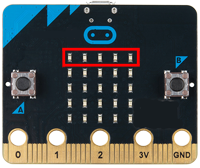
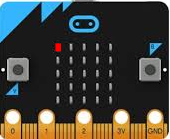
Note that the micro:bit uses only the top row of LEDs to measure the light level. If you cover this row, the displayed value should be 0. |
EXAMPLE |
| The ambient light level is measured using the command display.read_light_level()and displayed in the output window using print(). The measurement interval is 1000 milliseconds.
Program: from microbit import * while True: lightValue = display.read_light_level() print(lightValue) sleep(1000) |
TEMPERATURE SENSOR |
|
EXAMPLE |
| In this example, the temperature is measured in °C using the command temperature() and displayed in the output window using print().
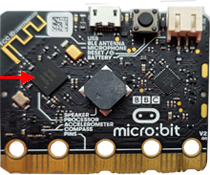
The measurement interval is 300 milliseconds. If you touch the micro:bit near the processor with your warm fingers, a higher temperature will be displayed.
Program: from microbit import * while True: temp = temperature() print(temp) sleep(300) |
TOUCH SENSOR |
|
EXAMPLE |
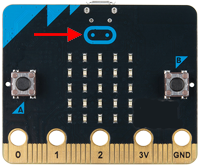
| The command pin_logo.is_touched()
returns True when you touch the logo and False otherwise. You can display these values in the output window using print(). In this example, the image YES is displayed on the LED display when the logo is touched. Otherwise, the image NO is displayed.
Program: from microbit import * while True: if pin_logo.is_touched(): display.show(Image.YES) else: display.show(Image.NO) sleep(100) Note: When checking a Boolean value, you do not need to write: if pin_logo.is_touched() == True: if pin_logo.is_touched():
|
MICROPHONE SENSOR |
|
EXAMPLE |
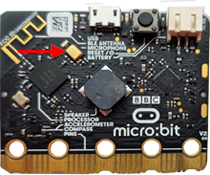
| In this example, the ambient sound level is measured using the command microfone.sound_level()
and displayed using print().
If the sound level is greater than 40, , all LEDs on the display light up for 500 milliseconds.
Program: from microbit import * def on(): for y in range(5): for x in range(5): display.set_pixel(x, y, 9) sleep(500) def off(): display.clear() while True: level = microphone.sound_level() print(level) if level > 40: on() else: off() sleep(100) |
REMEMBER ... |
The light sensor uses the command display.read_light_level() to return the ambient light level as a value between 0 and 255. The temperature sensor uses the command temperature() to measure the temperature in °C. The command pin_logo.is_touched() returns True if you touch the micro:bit logo. The command microfone.sound_level()returns the ambient sound level as a value between 0 and 255. |
EXERCISES |
|
 |
 |
 |